
复杂的 Web 小程序
本页面旨在指导开发者如何使用前端工程化工具构建一个复杂的 Web 小程序。
在开始操作本页面之前,请确保已学习以下内容:
关于复杂的 Web 小程序
复杂 Web 小程序允许开发者通过前端工程化工具,像 Vite 和 Vue,构建更加灵活和复杂的页面。这些页面通常包含动态内容、交互逻辑和与后端的实时通信,并可根据需求进行高度定制。
与入门教程相比,复杂 Web 小程序提供了更多的功能和灵活性,适合需要更复杂前端操作和交互的应用场景。
创建 Web 小程序插件包
在此处的示范中,我们将创建一个 Web 小程序类型的插件。该插件的功能是调用入门教程中的 MathService,并返回加法计算的结果显示在页面中。
提示
下文中的 MathPage 就是我们即将创建的 Web 小程序的插件名。
步骤一:创建空白的 Vite+Vue 项目
您可以从头开始手动创建,也可以使用插件开发包仓库中 "demo" 目录下的模板进行修改。
bash
pnpm create vue@latest这将启动 Vue 官方的项目脚手架工具,以下是项目创建过程的一个示例:
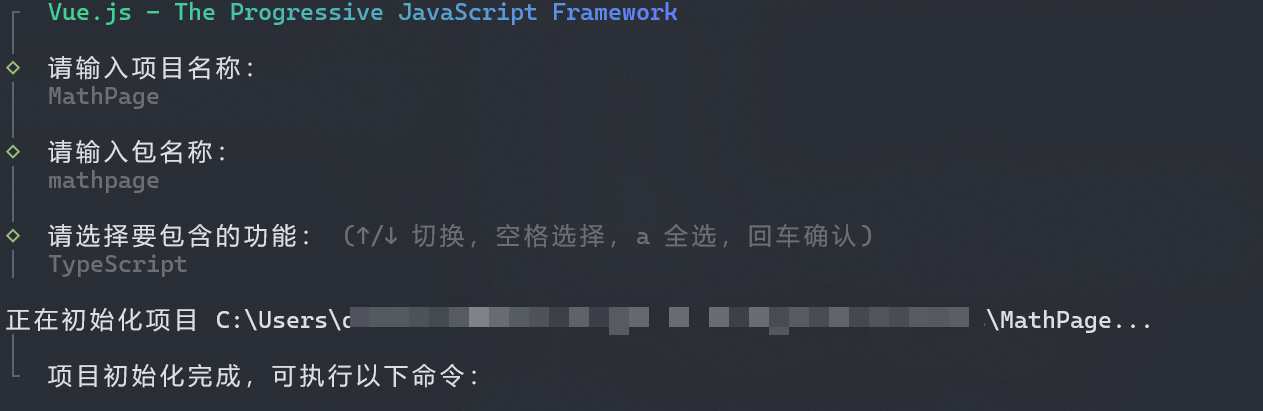
步骤二:完成初始化后,进入项目目录并安装依赖
bash
cd MathPage
pnpm i
pnpm i @agilebot/extension-runtime
步骤三:撰写代码
新建加法计算器组件:
vue
<script setup lang="ts">
import { ref } from 'vue';
import { callEasyService } from '@agilebot/extension-runtime';

const a = ref(0);
const b = ref(0);
const c = ref(0);

const handleCalculate = async () => {
  const result = await callEasyService('math', 'add', {
    a: a.value,
    b: b.value
  });
  c.value = result;
};
</script>

<template>
  <div class="math">
    <h1>加法计算器</h1>

    <div class="container">
      <label for="inputA">a:</label>
      <input type="number" v-model="a" placeholder="输入第一个数字" />

      <label for="inputB">b:</label>
      <input type="number" v-model="b" placeholder="输入第二个数字" />

      <button @click="handleCalculate">计算 a + b</button>
    </div>

    <div class="result">
      <p>
        结果: <span>{{ c }}</span>
      </p>
    </div>
  </div>
</template>

<style scoped>
.math {
  padding: 20px;
  display: flex;
  flex-direction: column;
  align-items: center;
}

.container {
  margin-top: 20px;
}

input {
  padding: 5px;
  margin: 10px;
  font-size: 1em;
}

button {
  padding: 5px 10px;
  font-size: 1em;
  cursor: pointer;
}

.result {
  margin-top: 20px;
  font-size: 1.2em;
}
</style>
在首页中导入 Math 组件:
vue
<script setup lang="ts">
import Math from './components/Math.vue';
</script>

<template>
  <Math />
</template>
值得注意的是,需修改 vite.config.ts 配置中的 base 选项:
ts
import { fileURLToPath, URL } from 'node:url'

import { defineConfig } from 'vite'
import vue from '@vitejs/plugin-vue'
import vueDevTools from 'vite-plugin-vue-devtools'

// https://vite.dev/config/
export default defineConfig({
  base: './',
  plugins: [
    vue(),
    vueDevTools(),
  ],
  resolve: {
    alias: {
      '@': fileURLToPath(new URL('./src', import.meta.url))
    },
  },
})
步骤四:编译 Vue 项目
bash
pnpm build步骤五:打包、安装
插件打包请参考打包与安装
需要注意的是,打包时的入口文件需选择 dist/index.html 。